Portfolio Website
My personal portfolio website, a showcase of my professional journey, technical skills, and creative endeavors. Built with cutting-edge web technologies, this site offers an immersive experience into my world of development and design.
Built 2 min readLive Demo (opens in a new tab)Code (opens in a new tab)
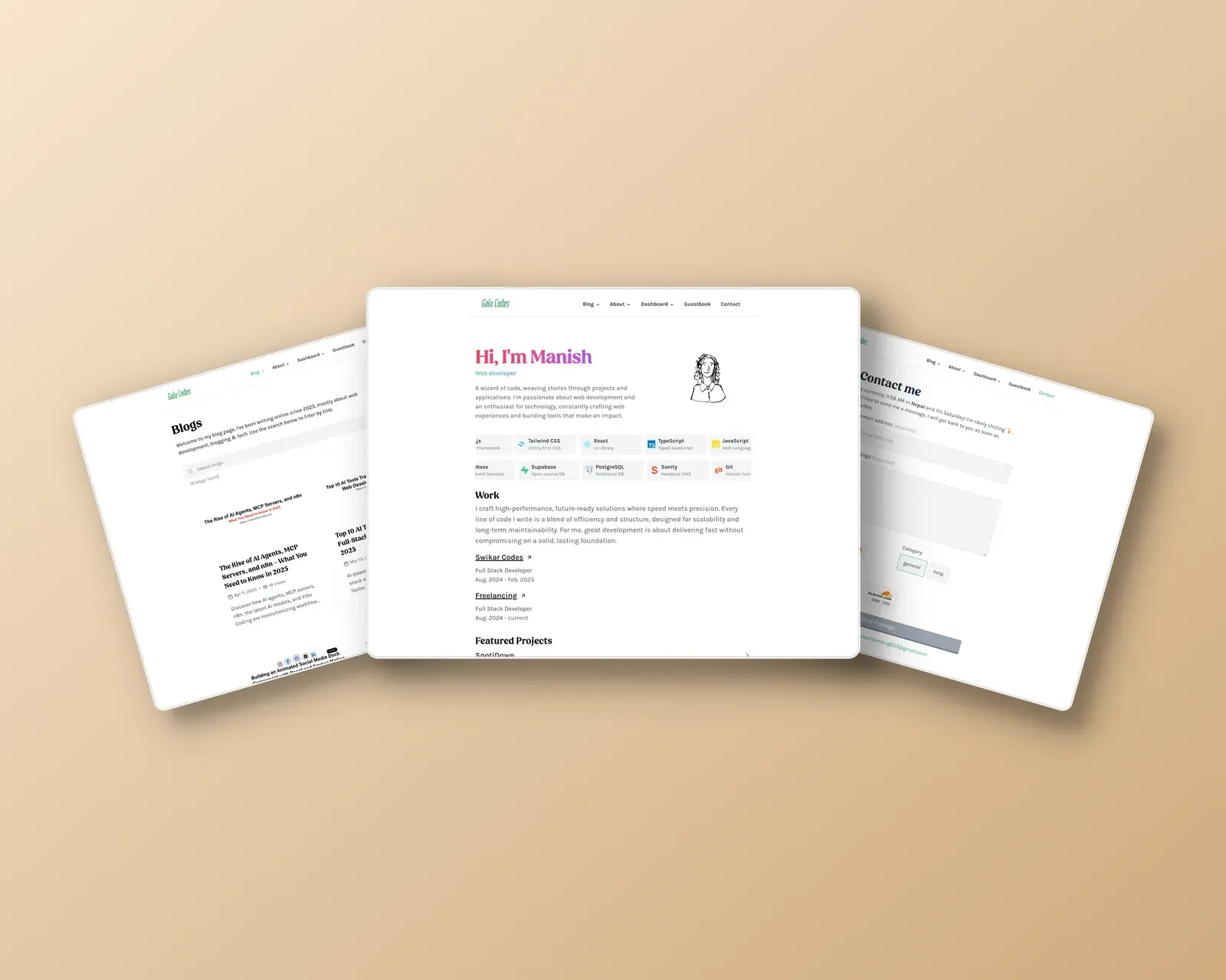
Manish Tamang - Personal Portfolio
🌐 Project Overview
Welcome to my personal portfolio website, a showcase of my professional journey, technical skills, and creative endeavors. Built with cutting-edge web technologies, this site offers an immersive experience into my world of development and design.
📋 Table of Contents
✨ Features
- Personal Blog: In-depth technical insights and personal experiences
- Interactive Project Portfolio: Showcasing development and design work
- Photography Gallery: Visual storytelling through photography
- “Uses” Page: Detailed breakdown of my daily tools and software
- Guestbook: Interactive visitor messaging system
- Protected Dashboard: Personalized stats and insights
- Spotify Integration: Real-time music listening tracker
- WakaTime Coding Stats: Transparent view of coding activities
- Responsive Dark/Light Themes
- MDX-Powered Blog Posts: Rich, interactive content
- SEO Optimized: Enhanced search engine visibility
🚀 Technologies
- Frontend Framework: Next.js
- Language: TypeScript
- Styling: Tailwind CSS
- Content Management: Sanity CMS
- Authentication: NextAuth.js, Firebase
- Deployment: Vercel
- Additional Libraries:
- Framer Motion
- Recharts
- Shadcn/ui
- Lucide React
🔧 Getting Started
Prerequisites
- Node.js (v18+)
- npm or Yarn
- Sanity CLI
- Firebase Project
- Spotify Developer Account
- WakaTime Account
Installation
-
Clone the repository:
git clone https://github.com/Manish-Tamang/portfolio.git cd portfolio -
Install dependencies:
npm install
Environment Configuration
Create a .env.local file with the following variables:
# Sanity Configuration
NEXT_PUBLIC_SANITY_PROJECT_ID=
NEXT_PUBLIC_SANITY_DATASET=production
SANITY_API_READ_TOKEN=

# Firebase Configuration
NEXT_PUBLIC_FIREBASE_API_KEY=
NEXT_PUBLIC_FIREBASE_AUTH_DOMAIN=
# ... (other Firebase configs)

# Spotify Integration
SPOTIFY_CLIENT_ID=
SPOTIFY_CLIENT_SECRET=
SPOTIFY_REFRESH_TOKEN=

# WakaTime Integration
WAKATIME_ACCESS_TOKEN=
WAKATIME_CLIENT_ID=

# Authentication
NEXTAUTH_SECRET=
NEXTAUTH_URL=http://localhost:3000

# Analytics
UMAMI_API_KEY=
WEBSITE_ID=
Running the Project
npm run devVisit http://localhost:3000 in your browser.
📂 Project Structure
portfolio/
├── app/             # Next.js app directory
├── components/      # Reusable React components
├── lib/             # Utility functions
├── public/          # Static assets
├── sanity/          # Sanity CMS configuration
├── styles/          # Global and module CSS
└── types/           # TypeScript type definitions
🔗 Integrations
Sanity CMS
Manage content through /studio route. Configure CORS settings in Sanity management.
Firebase
Handles:
- View counting
- User authentication
- Guestbook messages
Spotify & WakaTime
Real-time tracking of music and coding activities.
🤝 Contributing
- Fork the repository
- Create a feature branch
- Commit changes
- Push and open a pull request
📄 License
Distributed under the MIT License. See LICENSE for more information.
🙏 Acknowledgements
- Next.js Community
- Sanity.io
- Vercel
- Open-source contributors
- Typescript
- Nextjs
- Sanity